


Bingo Rush - Club Bingo Games
4.6332.00 Reviews
App Specs
- Version
- 1.4.25
- Updated On
- License
- Free
- Downloads
- 1,000,000+
- Developer
- Egleaf Digital Tech Limited
- Categories
- Board
- Platform
- Android
Screenshots




 Analysis by AppCompare
I judge a social bingo game not only by whether a round is lively, but by how comfortable it is to follow when I’m playing on a small screen, in a noisy room, or with only a few spare minutes. Bingo Rush - Club Bingo Games is designed around quick online play and a bright, themed presentation. That makes it inviting for casual sessions, though the same busy feel may not suit everyone.
Reading the screen and finding your way
My first impression was that the colorful presentation makes the game feel cheerful rather than like a plain digital bingo card. The main navigation is described as straightforward, and I found the basic idea easy to approach: choose a room, follow the calls, and take part in the round. For someone who already knows bingo, that familiar structure helps; a newcomer can understand the central activity without needing to learn a complicated strategy system.
The trade-off is that a screen full of calls, cards, effects, chat, and themed decoration can ask for more visual attention than a quiet, paper-based game. If you have difficulty distinguishing small details or tracking several things at once, I’d try a short session first and see whether the pace feels comfortable. I wouldn’t assume that a bright interface automatically means every element is easy to read in every setting.
Playing at your own pace and in different settings
Bingo Rush is a board game from Egleaf Digital Tech Limited, and its online, social framing is a big part of its appeal. I can see it working well when friends want a shared activity but aren’t in the same place, or when I have a short break and want something more interactive than a solo puzzle. The game is free to download, rated for Everyone, and has reached over a million installs, so it has a broad casual audience.
There are practical limits to that convenience. Online play is not the same as quietly marking a paper card: calls and on-screen activity require attention, and chat or other players can add stimulation. In a waiting room, on public transport, or beside someone who is resting, I’d keep the sound and surroundings in mind and avoid starting a round if I can’t give it enough focus. If visual or motor effort makes quick tapping uncomfortable, a slower offline game may be a better fit.
What to know before settling in
The social side can make a round feel less solitary, but it also changes the experience from traditional bingo. I’d choose this when I want company and a lively theme, rather than when I want the calm, predictable rhythm of a local hall or a paper card. Themed rooms add personality, while power-ups and competitive elements make the play feel more game-like. Those extras may be fun for players who enjoy making small choices during a round; anyone seeking a bare-bones bingo caller may find them distracting.
It’s worth keeping the spending model in view. The game costs nothing to download, but in-app purchases range from $0.99 to $204.99 per item. I’d decide on a personal spending limit before browsing any optional purchases, especially if competitive play makes boosts tempting. The published version is 1.4.20 and requires Android 5.0 or later on Android; the game is also available on iOS. Its average rating is 4.6 from around 4,900 ratings, with 332 written reviews, but ratings can’t tell you whether the visual pace or social style will suit you personally.
Worth Reading Before You Choose

EA SPORTS FC Mobile 26 Is a Bigger Football Game, but It Takes Time

Flipboard Shows What News Apps Must Do Beyond the Feed

Switching to Android Auto Means Rethinking Your Driving Routine

Google Calendar Makes a Crowded Week Easier to Manage

Ludo King Makes the Most of the Minutes Between Plans

Baby Panda World Brings Quick Play to Modern Phones, but Its Game Library Feels Busy
Who is likely to enjoy it?
I’d recommend giving it a try if you like bingo, enjoy friendly online play, and don’t mind a more colorful, feature-rich spin on a familiar board game. It can be a good choice for a casual get-together across distance, or for a brief break when you have enough attention to follow a round. If you prefer quiet solo play, have trouble with rapid visual changes, or want to avoid optional spending prompts altogether, a simple offline bingo app or physical cards may be a better match.
The Gameplay Experience
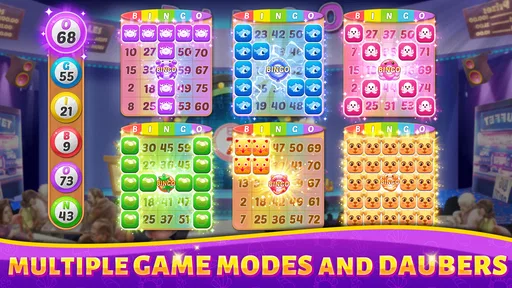
First things first, Bingo Rush - Club Bingo Games is all about that fast-paced bingo action. The app isn’t just a digital bingo card; it’s a full-blown bingo extravaganza. When I first opened the app, I was greeted with a sleek and colorful interface that immediately set the tone for a fun time. The navigation is straightforward, so even if you’re a bingo newbie, you’ll find your way around in no time.
One of the things that stood out to me was the variety of rooms and themes. You get to choose from a plethora of bingo rooms, each with its own unique vibe. Whether you’re feeling the tropical beach scene or a classic casino atmosphere, there’s something here for everyone. I personally loved the Halloween-themed room—spooky vibes are always a win in my book!
Features That Shine
The app isn’t just about playing bingo; it’s about creating a whole experience. Power-ups are a game-changer here. They give you that extra edge, whether it’s dabbing more numbers or getting a sneak peek at upcoming numbers. Trust me, once you’ve tried them, you’ll want to stock up.
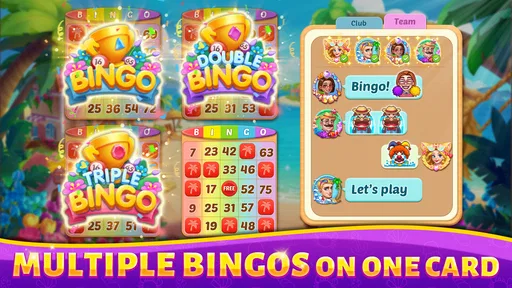
Another feature I found super engaging is the social aspect. You can connect with friends or other bingo lovers from around the globe. There’s a chat feature that lets you interact while playing, and it really amps up the excitement. Plus, they’ve got leaderboards, so if you’re the competitive type, you’ll love keeping track of your progress and aiming for that top spot.
Making a round work for your routine
A useful way to approach the game is to treat a session as a small planned activity, rather than something to open whenever a spare second appears. If I’m waiting for a friend, I’d start only when I can stay focused long enough to follow the calls; if I’m playing with someone remotely, I’d agree on a time first so neither person has to rush away mid-session. This is a simple habit, but it makes the social element feel more like a shared game and less like another stream of notifications competing for attention.
For a first visit, I’d explore the basic room choices before spending any resources on extras. That lets me see whether I prefer the themed atmosphere or the more familiar bingo feel, and whether the pace suits me. Once I know how I like to play, I can decide whether power-ups add enjoyment or simply make the screen busier. Their value is personal: they may appeal to someone who likes tactical nudges, while a traditionalist may prefer to let the called numbers carry the round.
How it compares with other ways to play bingo
Compared with paper cards or a local bingo hall, this game makes it easier to join an online session and gives the experience a more animated, social layer. That convenience comes with a different kind of attention: a physical card is easy to glance at, while a phone game asks me to watch the display and interact with it. A stripped-down bingo app may be preferable if all I want is a caller and a card, but it won’t necessarily provide the themed rooms and player interaction that make this one feel like a shared pastime.
It also sits somewhere between a traditional board game and a casual mobile game. The familiar bingo format keeps the learning curve approachable, while competitive features and power-ups add choices that aren’t central to a paper game. I’d pick it for variety and company, not for a quiet, screen-free evening or a purely luck-focused round without extra mechanics.
Keeping the social and spending sides comfortable
Chat can help a remote game feel warmer, but it may not be the reason everyone wants to play. If I’m joining mainly for bingo, I can focus on the cards and treat conversation as optional rather than feeling obliged to keep up with every message. That distinction matters for players who find simultaneous reading and number tracking tiring. It also makes the game easier to fit into a group with different social habits: some can chat, while others simply enjoy the shared round.
For spending, I’d separate “free to start” from “free of temptation.” Optional purchases can be attractive when boosts or competition are part of the fun, so I’d check what I’m choosing before confirming anything and set a limit that feels comfortable. The broad price range means purchases can differ substantially, and no one needs to buy something just to decide whether the basic style of play suits them. If you’re setting up the game for a child, it’s sensible to talk about purchases first and use the device’s usual purchase controls.
In-App Purchases and Rewards
Now, let’s talk about the in-app purchases. The app is free to download, which is great, but like most apps, it offers in-app purchases. These can enhance your gameplay with added features and more power-ups. However, if you’re like me and prefer not to spend, the game still offers plenty of opportunities to earn rewards and bonuses by simply playing regularly. Daily log-ins and completing challenges can earn you coins and power-ups, so there’s always a way to keep the fun going without breaking the bank.
Visual and sound comfort
Themed art and sound can make a round feel lively, but they are also worth considering if you’re sensitive to visual clutter or audio stimulation. I’d try the game in a calm setting first, with the phone held at a comfortable distance, before deciding whether its effects help or distract. If the screen feels too busy, taking a break between rounds is more sensible than pushing through. A person who prefers minimal animation and quiet play may be happier with a plain-number format, while players who enjoy atmosphere may find the themes part of the draw.
For people with limited dexterity, the key question is whether the pace and tapping feel manageable on their own device. I wouldn’t assume that every interaction is effortless just because bingo is a simple game. A short trial can reveal whether you can comfortably follow the calls and mark numbers without strain. If not, playing fewer rounds at a time or choosing a slower alternative is a reasonable choice; the point is to enjoy the game, not to keep up at the cost of comfort.
Graphics and Sound
The visuals are vibrant and engaging. Each bingo room is well-designed, bringing its theme to life with stunning graphics and animations. The sound effects add to the excitement, with the classic bingo caller voice and fun background music that keeps you pumped. You can tell the developers put a lot of thought into making sure the app isn’t just functional but also visually appealing.
What I’d check before recommending it to a group
If you’re inviting friends, I’d first make sure everyone actually wants a quick, lively bingo game rather than a long catch-up or a quiet card game. The app’s social tools are a strength when the group enjoys playing together, but the competitive angle may not appeal to someone who dislikes leaderboards or game boosts. A good compromise is to treat winning as secondary and use the round as a shared activity; if the group wants conversation without watching a screen, a video call or a traditional game may be more comfortable.
For someone new to mobile bingo, the most useful first question is not “How do I win?” but “Do I like this pace and presentation?” The familiar rules help, but the rooms, effects, and other players create a distinct feel. I’d give the basic experience a little time before deciding whether to pursue rankings or use power-ups. That keeps early play low-pressure and gives you a clearer sense of what you genuinely enjoy.
Graphics and Sound
The visuals are vibrant and engaging. Each bingo room is well-designed, bringing its theme to life with stunning graphics and animations. The sound effects add to the excitement, with the classic bingo caller voice and fun background music that keeps you pumped. You can tell the developers put a lot of thought into making sure the app isn’t just functional but also visually appealing.
Final Thoughts
Overall, Bingo Rush - Club Bingo Games is a must-have for any bingo enthusiast. It’s got the perfect mix of traditional gameplay with modern twists. Whether you’re looking to kill time or seriously climb the bingo ranks, this app has you covered. With its engaging features, social elements, and lively graphics, it’s more than just a game—it’s a whole experience.
If you haven’t already, give it a shot. It’s available on both Android and iOS, so you can join the bingo rush no matter what device you’re using. Happy playing, and may your cards be ever in your favor!
Pros
- Fast-paced gameplay keeps excitement high.
- Variety of bingo rooms and themes available.
- User-friendly interface for easy navigation.
- Engaging social features to connect with friends.
- Regular updates with new challenges and rewards.
Cons
- Requires internet connection to play.
- In-app purchases can be expensive.
- Occasional ads may interrupt gameplay.
- Limited offline play options available.
- Some themes require higher levels to unlock.
FAQs for Bingo Rush - Club Bingo Games
What is Bingo Rush - Club Bingo Games?
Bingo Rush - Club Bingo Games is a fast-paced bingo game available on Android and iOS, designed for both beginners and seasoned players. It offers various bingo rooms with different themes, power-ups, and daily challenges to keep you engaged. The game aims to provide a fun, social experience with a competitive edge.
Is Bingo Rush - Club Bingo Games free to play?
Yes, Bingo Rush - Club Bingo Games is free to download and play. However, it does offer in-app purchases for players who want to enhance their experience with additional power-ups, coins, or tickets. These purchases are optional and not necessary to enjoy the core game features.
How does the multiplayer feature work in Bingo Rush?
Bingo Rush allows you to play with friends or compete against players worldwide. You can join different bingo rooms and participate in multiplayer matches. The game also includes chat features, so you can communicate with other players, making it a more interactive and social experience.
What devices are compatible with Bingo Rush - Club Bingo Games?
Bingo Rush is compatible with most Android and iOS devices. Ensure that your device is running a relatively recent version of its operating system to guarantee optimal performance. It's always a good idea to check the app store for specific compatibility requirements before downloading.
Are there any tips for beginners in Bingo Rush?
For beginners, it's crucial to start with the basic bingo rooms to get a feel for the game mechanics. Utilize the power-ups wisely and focus on completing daily challenges to earn rewards. Joining a club within the game can also provide additional benefits and tips from more experienced players.


